
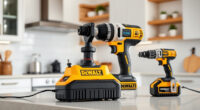
Getting started with your new DEWALT power tools can seem daunting, but with a clear, step-by-step approach, you’ll be up and running in no time. Proper setup not only ensures optimal performance but also keeps you safe during use.

Get garden gear delivered free with Prime
- Fast, free delivery on millions of items
- Prime Video, Amazon Music and more included
- Member-only deals all year
In this guide, we focus on the DEWALT 20V MAX Cordless Drill Driver Set, a versatile and powerful tool perfect for a range of projects. We’ll cover essential safety tips, assembly instructions, and maintenance advice to help you get the most out of your new equipment.
Key Takeaways
| Safety First | Always wear safety gear and read the manual before setup. |
| Battery Precautions | Use only compatible DEWALT batteries and chargers. |
| Proper Assembly | Securely install bits and attachments to prevent accidents. |
| Maintenance Matters | Regularly clean and check your tools for optimal longevity. |
| Troubleshooting Tips | Identify common setup issues and how to solve them. |
Preparing Your Workspace and Safety Gear
- Choose a clean, well-lit workspace free of clutter to avoid accidents and ensure easy access to tools and accessories.
- Wear appropriate safety gear, including safety glasses, gloves, and hearing protection, especially when using power tools.
- Read the user manual thoroughly to understand the features and safety instructions specific to your DEWALT drill model.
Inspecting and Charging Your Battery
Before beginning setup, inspect your DEWALT 20V MAX 5 Ah Lithium-Ion Battery for any damage or debris. Make sure the battery contacts are clean.
Charge the battery using the compatible DEWALT charger until the LED indicator shows a full charge. This ensures maximum runtime and prevents power issues during operation.
Always use authorized DEWALT batteries and chargers to avoid damaging your tool or voiding the warranty.
Assembling Your DEWALT Drill Driver
- Insert the charged battery into the base of the drill until it clicks securely into place.
- Select the appropriate drill bit or driver bit for your task. Use the DEWALT Drill Bit Set for versatile applications.
- Loosen the chuck by turning it counter-clockwise and insert the bit, then tighten it securely by hand or with the chuck key if applicable.
- Check that the bit is firmly secured before powering on.
Powering Up and Testing Your Setup
Press the trigger to turn on the drill. Use the LED light to illuminate your work area, especially in dim conditions.
Test the drill on scrap material to ensure the bit is secure and the tool functions properly. Adjust the 2-speed transmission depending on your task: low speed for heavy-duty drilling, high speed for lighter work.
Maintenance and Troubleshooting
After each use, clean the drill and bits with a dry cloth. Store them in a dry, secure location.
If your drill isn’t working properly, check the battery charge, ensure the bit is properly installed, and inspect for debris or damage. Replace worn or broken parts promptly.
Regular maintenance extends the life of your tools and keeps them performing at their best.
The Products in This Guide

DEWALT 20V MAX Cordless Drill Driver Set
- ✔ Dimensions: 7.6 in.
- ✔ Max Torque: 340 UWO
- ✔ Included Accessories: Battery and charger

DEWALT Drill Bit Set
- ✔ Package: 14 pieces
- ✔ Compatibility: All standard drills
- ✔ Durability: High
DEWALT 20V MAX Cordless Drill Driver Set
The DEWALT 20V MAX Cordless Drill Driver Set combines power, speed, and durability, making it ideal for both DIYers and professionals. Its brushless motor offers longer run time, and the lightweight design ensures ease of use in tight spaces.
Pros:
- Brushless motor for increased efficiency
- Compact and lightweight for maneuverability
- Includes 2.0 Ah battery and charger
- LED work light for dim areas
Cons:
- Battery life may vary with heavy use
- Chuck size limited to 1/2 inch
Best for: General-purpose drilling and fastening in tight or hard-to-reach spaces
Not ideal for: Heavy-duty industrial applications requiring more power
Bottom line: A versatile, reliable drill set perfect for most DIY and professional projects.
DEWALT Drill Bit Set
This DEWALT Drill Bit Set features 14 high-speed steel bits with a 135-degree split point, perfect for drilling into plastic, wood, and metal. Its durability and precision make it a valuable addition to your toolkit.
Pros:
- High-speed steel construction
- Split point design reduces walking
- Includes multiple sizes
- Corrosion-resistant coating
Cons:
- Limited to specific materials
- Bits may wear faster under heavy use
Best for: Versatile drilling across various materials
Not ideal for: Heavy industrial drilling without specialized bits
Bottom line: A reliable drill bit set that enhances your drilling precision and durability.
Frequently Asked Questions
How do I change the drill bit on my DEWALT drill?
Loosen the chuck by turning it counter-clockwise, insert the new bit, then tighten the chuck securely. For models with a keyless chuck, ensure the bit is fully seated and tighten by hand.
What is the best way to store my DEWALT power tools?
Store your tools in a dry, cool place, preferably in their cases or a dedicated toolbox. Keep batteries separate from the tools when not in use for extended periods.
How can I extend the battery life of my DEWALT drill?
Keep batteries charged but avoid overcharging. Store batteries in a cool, dry place, and use the tool regularly to maintain battery health.
What should I do if my drill is not turning on?
Check the battery charge, ensure the battery is properly seated, and inspect for any debris or damage in the chuck or motor area. Replace or repair as needed.
Are DEWALT tools compatible with other brands’ batteries?
No, DEWALT batteries are designed specifically for their tools and are not compatible with other brands’ equipment.
Power Up with Confidence: Your DEWALT Setup Guide
Setting up your DEWALT power tools correctly is essential for safety, performance, and longevity. By following these simple steps, inspecting your equipment, and maintaining your tools properly, you’ll ensure efficient and safe operation for all your projects. Remember, a well-prepared workspace and the right accessories make all the difference in achieving professional results. Happy drilling!
Affiliate disclosure: As an Amazon Associate we earn from qualifying purchases. Prices and availability are accurate as of the time of publishing.
Fall Picks
fall essentials
As an affiliate, we earn on qualifying purchases.